Native macOS · Windows (Coming Soon)

Your meetings.
Captured. Distilled.
Organized.

Most AI meeting assistants need an awkward bot in your Zoom call.
MinuteWire works in the real world — boardrooms, coffee shops, whiteboard sessions, and your desk.

Download for macOS Windows Coming Soon

$29 one-time · No subscription · Bring your own Gemini API key
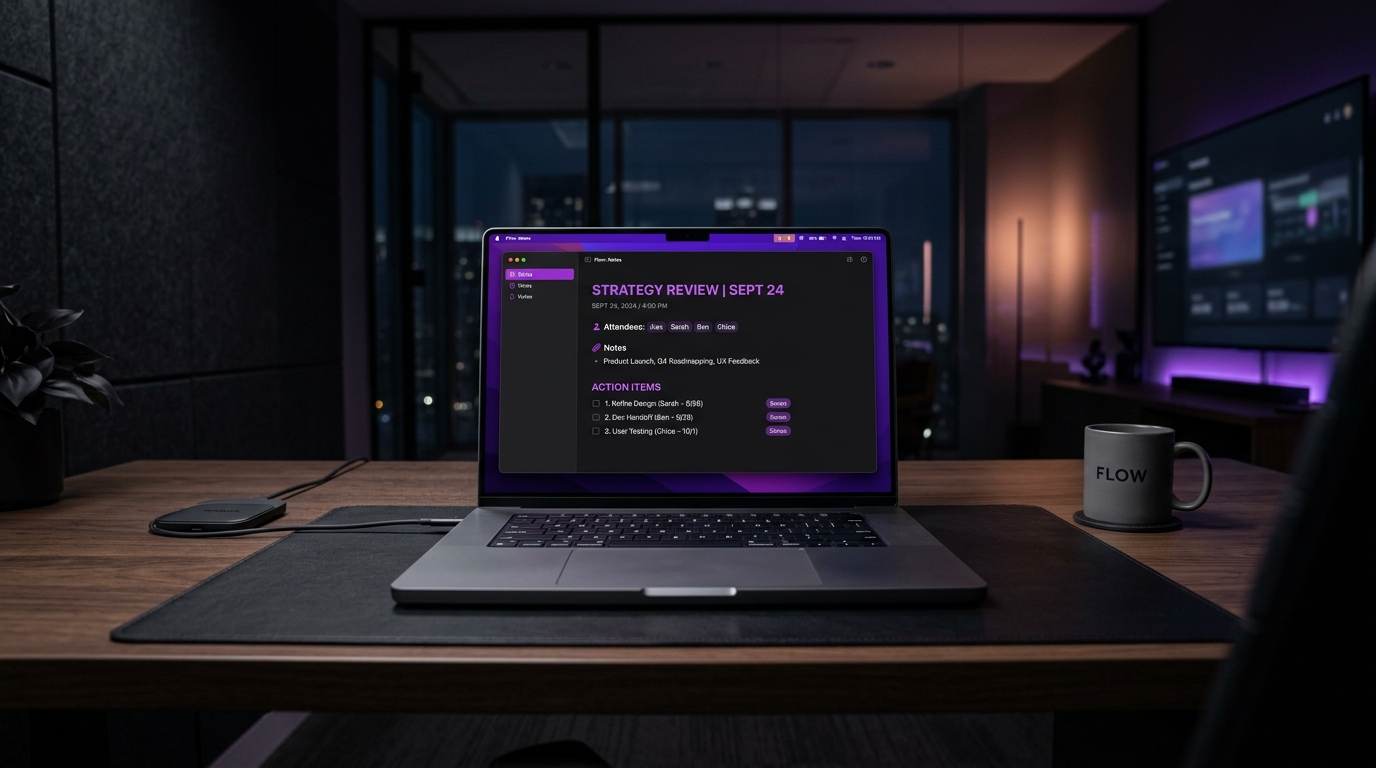
MinuteWire running on MacBook Pro

How MinuteWire Works

1

Hit Record

Click the tray icon or press ⌘⇧R. MinuteWire captures audio from your mic — invisibly, silently.

2

AI Summarizes

Gemini Flash analyzes the audio and extracts structured notes — title, attendees, summary, action items, and decisions.

3

Copy & Ship

One-click copy as Markdown, JSON, or action items. Paste directly into Notion, Jira, Slack, or your project tracker.

Built Different

🎙️

Native Audio Capture

Direct microphone access via CoreAudio (macOS) and WASAPI (Windows). No browser extensions, no bots, no calendar integrations.

🔒

Local-First & BYOK

Audio never leaves your machine. Bring your own Gemini API key — your data flows directly from your desktop to Google's API. We never see it.

👻

Invisible & Silent

Runs as a tiny menu bar icon. No participant alerts, no bot joining calls, no "Recording has started" notifications to your colleagues.

⚡

Structured Output

Not a wall of text. MinuteWire outputs title, attendees, executive summary, prioritized action items with owners, and key decisions.

🌍

Works Everywhere

Boardrooms, coffee shops, phone calls, whiteboard sessions, therapy rooms, lecture halls. If you can hear it, MinuteWire can capture it.

💰

One-Time Purchase

No monthly subscription. No usage caps from us. Pay once, own forever. Your only ongoing cost is your own Gemini API usage (~$0.01/meeting).

Where MinuteWire Shines

Professional Services

In-Person Client Consultations

Lawyers, accountants, wealth managers. Keep your laptop on the table — MinuteWire captures commitments and generates a polished client memo before your client exits the parking lot.

Engineering Teams

Whiteboard & Architecture Sessions

The best technical decisions happen in front of a whiteboard. MinuteWire isolates accepted paths, rejected options, and outputs Jira-ready tasks with assigned owners.

Creative Agencies

Discovery & Strategy Workshops

Chaotic client sessions over coffee become structured deliverables, budget ceilings, timeline milestones, and pain points — ready to paste into your SOW.

Solo Founders

Voice Brain Dumps & Ideation

Speaking is 4x faster than typing. Pace the room and talk. MinuteWire turns stream-of-consciousness into structured PRDs, memos, or Markdown outlines.

Healthcare Professionals

Private Clinical & Intake Consultations

Converse naturally with patients. BYOK architecture means sensitive audio never touches third-party servers — it processes through your own private pipeline.

MinuteWire vs. Legacy Bots

Feature Legacy Bots
Otter, Fireflies, etc.
MinuteWire
Native Engine
Physical World Support ✕ Fails Online meetings only ✓ Works Anywhere speech happens
Social Presence ✕ Awkward Joins participant lists ✓ Invisible Silent tray icon
Platform Dependency ✕ Locked Calendar, OAuth, webhooks ✓ Zero Works on any audio
Data Privacy ✕ Cloud Audio on their servers ✓ Local BYOK, zero retention
Pricing ✕ $20+/mo Recurring forever ✓ $29 One-time, forever

Capture Zoom, Teams & Streams — Without Any Bot

MinuteWire is built for the ambient real world. But with a simple, free virtual audio driver, you can capture crystal-clear two-way audio from online meetings even with headphones on.

Step 1

Install Virtual Loopback

Download a free, lightweight virtual audio bridge:

macOS: BlackHole 2ch brew install blackhole-2ch
Windows (Coming Soon): VB-CABLE or Virtual Audio Cable
Step 2

Combine Mic & System Audio

In macOS Audio MIDI Setup (Spotlight search):

  • Multi-Output Device: Select your Headphones + BlackHole 2ch so you can still hear the call.
  • Aggregate Device: Check your Microphone + BlackHole 2ch so MinuteWire captures both your voice and remote speakers.
Step 3

Select in MinuteWire & Record

In MinuteWire Settings ➔ Audio Input Device:

  • Choose your new Aggregate Device (or BlackHole).
  • Hit Record anytime during your Zoom, Teams, or Meet call.
  • AI transcribes both sides with full speaker attribution!

Works Seamlessly Across Your Entire Meeting Stack

Zoom Meetings

Set Zoom speaker output to your Multi-Output Device. Record full executive briefings without an awkward recording bot joining the room.

Microsoft Teams

Direct Teams audio through BlackHole. Capture client consultations, sprint reviews, and cross-team strategy completely unobtrusively.

Google Meet & Web Calls

Any audio playing through Chrome, Safari, or Brave is captured in full digital fidelity alongside your own microphone.

Recorded Meetings & Streams

Have a pre-recorded Zoom MP4 or a video lecture? Play it through BlackHole to generate instant structured notes and action items.

Own It Forever

Lifetime License
$ 29 one-time
  • ✓ macOS (Windows coming soon)
  • ✓ Unlimited recordings
  • ✓ All export formats
  • ✓ Lifetime updates
  • ✓ Bring Your Own Gemini Key
  • ✓ Priority support
Buy Lifetime License

Gemini API costs ~$0.01 per meeting

Most Popular
Cloud Pro
$ 9 /month
  • ✓ Everything in Lifetime
  • ✓ No API key needed
  • ✓ We handle the AI costs
  • ✓ 60 hours/month included
  • ✓ 1-click setup
  • ✓ $79/year option (save 27%)
Start Cloud Pro

Cancel anytime · 7-day money-back guarantee

Stop taking notes.
Start taking action.

Download MinuteWire and turn every conversation into structured, actionable intelligence.